

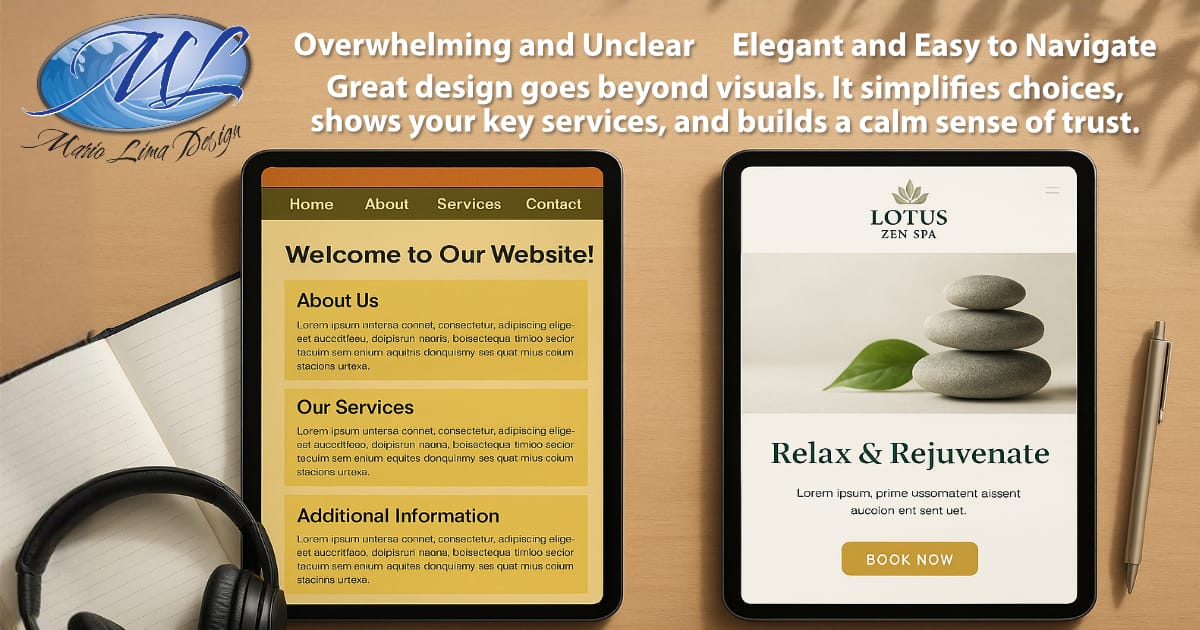
Most small business owners put all their energy into their services, their clients, and keeping the business running. But once your website goes live, it is easy to miss something important. The text on your site influences how people feel in the first few seconds, and it can quietly push visitors toward booking or quietly send them away.
You do not need to be a writer to have a website that feels clear and welcoming. You only need a few simple shifts in how your text is written, structured, and presented. These changes make a surprising difference in how many people stay, read, and decide to work with you.
Below are the most common website text mistakes I see when auditing small business and wellness websites, and what you can do to fix them.
Why Your Website Text Matters More Than You Think
When someone visits your website, they are looking for clarity. They want to understand:
What you do
Who you help
Why your service matters
What will happen next if they book or contact you
If your text feels confusing, overwhelming, or unclear, people hesitate. Hesitation is the number one reason visitors leave without taking action.
Website text does not need to be complicated. It needs to be clear.
For more on clarity, you might like What Makes a Great Small Business Website.
Mistake 1: Talking About Yourself Instead of the Client
This is the most common problem I see when reviewing websites for small businesses and wellness providers. Many sites start with:
“I have been in business for twenty years”
“Our company is dedicated to excellence”
“I am certified in…”
There is nothing wrong with sharing your experience. It just should not come first. Visitors care most about how you will help them. If your text focuses on your story before their problem, they tune out.
Try this instead:
Start with the client. Then introduce yourself as the person who understands their needs.
This shift alone can increase engagement and time on page.
Mistake 2: Confusing or Overly Complex Wording
Small business owners often think their text needs to sound formal or technical to appear professional. In reality, complex language creates confusion and undermines trust.
People hire businesses that communicate clearly. Examples of confusing wording:
Long paragraphs that try to say too much
Industry jargon
Abstract phrases
Explanations that feel heavy
Visitors should understand your message even if they are tired, stressed, or multitasking.
For a deeper look at clarity, see What Makes a Homepage Actually Convert.
Mistake 3: No Clear Call to Action or Too Many Calls to Action
Your website should gently guide visitors to the next step. The next step might be:
Booking an appointment
Sending a message
Requesting a quote
Reading your services
If your page has no clear action, visitors assume they are done and leave. If you have too many actions, they freeze and do nothing.
Every page should support one primary action. Other actions can exist, but the main one should stand out.
This is one of the strongest ways to boost conversions on any website.
Mistake 4: Large Walls of Text That Are Hard to Read
People rarely read websites word for word. They scan.
Big blocks of text create friction. On mobile, they are even worse. Visitors scroll past them or leave the site altogether.
To make your text easier to read:
Break content into short paragraphs
Add clear headings
Use spacing to create comfort
Keep sentences simple
Avoid cramming everything into a single section
This also supports accessibility, which improves both user experience and search visibility.
You can see more readability guidance in Website Mistakes That Hurt SEO.
Mistake 5: Text That Does Not Guide the Reader
Even if your text is readable, it still needs structure. People rely on headings, subheadings, and clear flow to understand what you offer.
A common issue is content that jumps around without a clear path. For example:
Benefits appear before the problem
Pricing appears without context
Services are listed without explaining who they help
Important details are buried in unrelated sections
Guiding the reader is about creating a path that feels natural and safe. Your website text should answer questions in the order people ask them. This reduces confusion and encourages action.
Quick Fix Checklist
Here are simple ways to improve your website text today:
Start by addressing your visitor, not yourself
Keep sentences short and clear
Use headings to guide people through each section
Break long paragraphs into smaller pieces
Add a clear, friendly call to action
Remove anything that repeats the same idea
Make sure your text is readable on mobile
Use everyday language instead of industry jargon
Small adjustments can make your website feel more professional and welcoming.
When It Is Time to Get Help
You might need support if:
People visit your site but do not book
Your services are strong, but your website does not reflect that
Writing takes too much time and leaves you feeling stuck
The text on your site feels old or out of date
The structure of your pages no longer fits your business
This is when a website audit or redesign can help you communicate more clearly and confidently.
Let Your Website Speak Clearly for You
Your website does not need to be complicated. It just needs to make your message clear.
If you want support improving your website text or understanding why your current site is not converting, I am here to help. A simple audit can show you exactly what to fix and how to create a site that feels calm, welcoming, and ready to bring in new clients. Ready for your Free Website Checkup? Get started by clicking the button below!
Frequently Asked Questions
Why does wording matter so much on a website?
People need clarity to feel confident. If your site is confusing, visitors leave before they understand what you offer.
Do I need a full rewrite to fix my content?
Not always. Many sites improve quickly with spacing, clearer headings, and shorter sentences.
What if I have a lot to say about my services?
It is fine to have detailed information. It just needs structure so visitors can scan easily without feeling overwhelmed.
How can I tell if my website text is hurting conversions?
If people visit your site but do not contact you, or if you get the wrong types of inquiries, unclear text may be the cause.



0 Comments